
2D drawings remain essential in architecture, construction, mechanical engineering and manufacturing. Businesses use them to design products, carry out projects and exchange technical data.
However, as engineering teams grow, CAD licensing costs become an important consideration. Businesses need software that meets their requirements and a licensing model that matches actual usage.
Alongside features and DWG compatibility, businesses should consider how many people need to use CAD at the same time. This helps determine the number of licenses required.
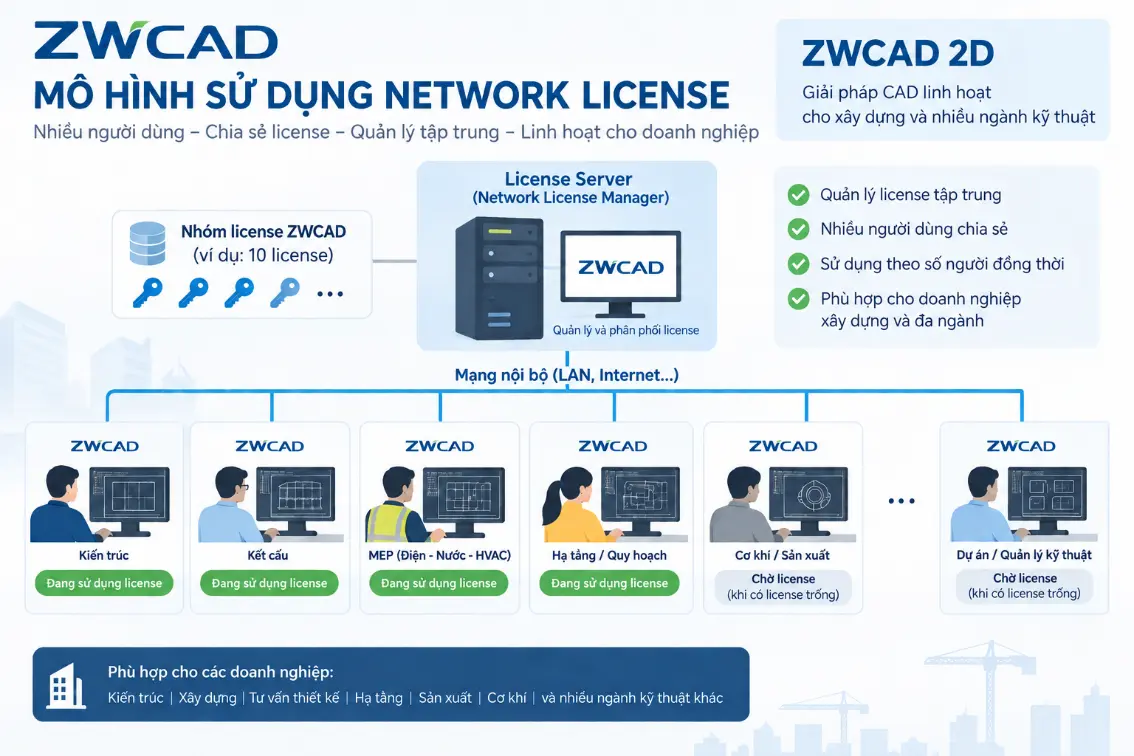
ZWCAD is a 2D CAD solution from ZWSOFT. With a Network License, businesses can install the software on multiple computers and share a license pool managed on a server.
What is a ZWCAD Network License?
ZWCAD supports two common licensing models:
- Standalone License: A license is activated on an individual computer. This model suits users who regularly work on one computer.
- Network License: Multiple computers share a license pool over a network. The Network License Manager (NLM) on the server manages and distributes licenses.
With network licensing, the number of simultaneous sessions is limited by the number of licenses purchased. Businesses can therefore install ZWCAD on multiple computers without buying a separate license for each one.
Benefits of ZWCAD Network License
- Control licensing costs: Choose the number of licenses based on simultaneous usage.
- Manage licenses centrally: Monitor and distribute licenses through the License Server.
- Share licenses flexibly: Allocate licenses across computers and departments.
- Work offline: Use the Borrow License feature when a license needs to be temporarily taken off the server.
- Expand as needed: Add licenses when simultaneous usage increases.
Each license is shared rather than reserved for one computer. Users obtain a license from the shared pool when they open the software.
When a user closes the software and the license returns to the server, another user can access it. This gives businesses more flexibility in allocating licenses across departments.
Example: 20 architects, 10 simultaneous sessions
A construction company has 20 architects. However, at peak times, only around 10 people need to use ZWCAD simultaneously.
In this case, the company could consider purchasing 10 Network Licenses and installing the software on all 20 computers. This license pool supports up to 10 simultaneous sessions.
If all 10 licenses are in use, the next user must wait for a license to become available. Businesses should therefore assess peak demand before deciding how many licenses to purchase.
To calculate actual savings, businesses need to compare Network License and Standalone License quotations. Choosing the right model helps control costs while meeting work requirements.
Which businesses benefit from network licensing?
In construction companies, CAD usage varies by department and project stage. Each team may need the software for different tasks:
- Architects: Develop floor plans and architectural details.
- Structural engineers: Create and revise structural drawings.
- MEP engineers: Develop electrical, plumbing and HVAC layouts.
- Project and site engineering teams: View or edit drawings when needed.
With network licensing, these teams can share licenses within the same system. This model suits businesses with many engineers who do not all use CAD at the same time.
Mechanical engineering, manufacturing, electrical and electronics businesses can also consider this model. The key is to assess simultaneous usage and deployment requirements.
Learn more
- ZWCAD: A 2D CAD solution for optimizing business costs
- Introducing ZWCAD 2026: Faster design, easier creativity
Contact Vietbay for advice on the licensing model and number of licenses that best suit your business.