
NX CAM 2606 introduces a range of enhancements from Siemens designed to increase programming productivity, reduce toolpath calculation time, and improve CNC machining efficiency.
The latest release focuses on multiple stages of the CAM workflow, from fixture preparation and cutting tool management to toolpath calculation and advanced milling and turning strategies.
Key enhancements include Background Generate, Fixture Automation, Helical Cut Pattern, Planar Deburring, Face Mill Zig Zag, and Rough Turn Adaptive. These features help reduce programming downtime, simplify machining setup, optimize tool movements, and improve machining efficiency when working with difficult-to-cut materials.
1. Background Generate: Improve NX CAM Programming Productivity
One of the notable enhancements in NX CAM 2606 is Background Generate, a feature introduced in NX 2512 that allows toolpaths to be calculated in the background without interrupting the programmer’s work.
While NX calculates toolpaths in a separate process, users can continue editing models, modifying machining parameters, or creating other operations.
Calculation progress can be monitored in real time, while the system manages dependencies between operations to help prevent changes that could disrupt the programming workflow.
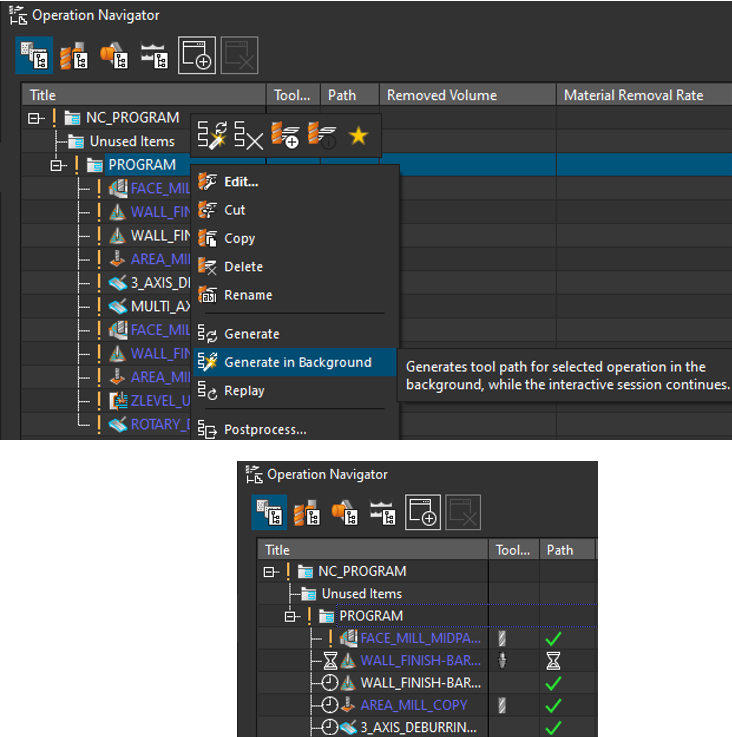
For parts involving dozens or hundreds of machining operations, toolpath calculation time can significantly affect programmer productivity. Background Generate allows programmers to use this waiting time for other tasks, reducing idle time and improving overall efficiency.
2. Fixture Automation: Simplify Fixture Setup
Fixture setup is an important stage in machining preparation, but it can be time-consuming when performed manually. Fixture Automation in NX CAM helps automatically position fixtures relative to the workpiece, simplifying the setup process.
Users can add fixtures to a library or insert them directly into a setup through an intuitive interface. The feature supports various fixture types, including vises, clamps, tombstones, and custom fixtures.
In the 3D environment, users can view and adjust the workpiece position directly after inserting a fixture into the setup. This reduces manual setup operations and helps standardize fixture usage across machining programs and programmers within an organization.
3. Helical Cut Pattern: Optimize Spiral Toolpaths in Planar Mill
Helical Cut Pattern in Planar Mill is a notable enhancement in NX CAM 2606, simplifying the creation of helical toolpaths for planar milling operations.
Users can directly configure parameters for the helical cut pattern and flexibly combine roughing and finishing strategies for features such as pockets and 2.5D bosses within the same programming workflow.
Direct control over helical cutting parameters reduces setup effort and helps generate toolpaths that better match machining requirements. This enables programmers to shorten program preparation time and develop more flexible machining workflows.
4. New Dedicated Tools for Front and Back Chamfering
NX CAM 2606 adds two dedicated chamfering tool types to the Cloud Connect Tool Manager: Front Chamfer Mill and Back Chamfer Mill.
Instead of using a generic tool definition, users can directly specify key tool geometry parameters, including front and back angles, cutting diameter, and overall length. The system also supports ISO-standard tool naming, helping organizations manage and synchronize tool data more consistently.
Accurate tool geometry definitions enable more realistic machining simulations. They also provide a basis for checking collisions and verifying material removal before the program is sent to the machine.
5. More Flexible Planar Deburring with Additional Tool Types
NX CAM 2606 expands the capabilities of the Planar Deburring strategy by adding support for more tool types, including Front Chamfer Mill, Back Chamfer Mill, Dovetail Mill, and Spherical Mill.
One notable improvement is the ability to deburr both the top and bottom faces of a part within a single operation, rather than creating separate operations for each side.
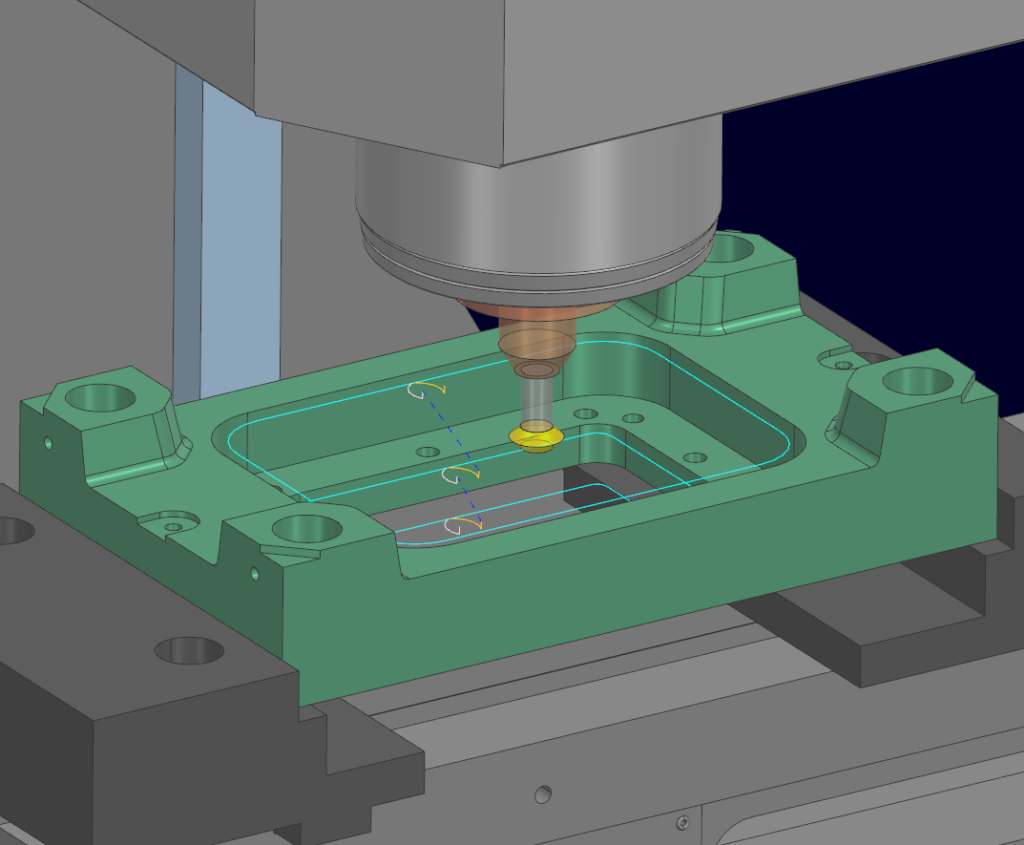
In addition to supporting more tool types, NX CAM 2606 introduces settings such as Overlap Distance, control over tool engagement and retraction heights, and Linear Engage mode.
These options provide better control over tool movements, produce smoother toolpaths, and help minimize tool marks on the surface. As a result, edge quality can improve, the number of required operations may be reduced, and programming time can be shortened.
7. Face Mill Zig Zag: Optimize Multi-Surface Machining
The Face Mill Zig Zag strategy in NX CAM 2606 has been enhanced to support machining multiple faces within a single operation. Programmers can specify the machining sequence or let the system automatically optimize it to reduce non-cutting machine movements.
Additional options also allow users to control tool movements around holes, pockets, and interrupted surface areas. This helps minimize unnecessary movements and manage the loads applied to the cutting tool. For parts with multiple faces requiring milling, combining surfaces within a single operation simplifies the program, reduces machining time, and can help extend tool life.
8. Rough Turn Adaptive: Optimize Rough Turning of Difficult-to-Machine Materials
Rough Turn Adaptive is one of the notable NX CAM 2606 enhancements for high-productivity rough turning. The strategy is designed for difficult-to-machine materials such as Hastelloy and Inconel. It optimizes the toolpath to maintain a more consistent chip thickness throughout the cutting process.
Controlling chip thickness helps maintain more stable cutting loads, reduce cutting force fluctuations, and promote more consistent tool wear. This can improve insert life when machining hard-to-cut materials.
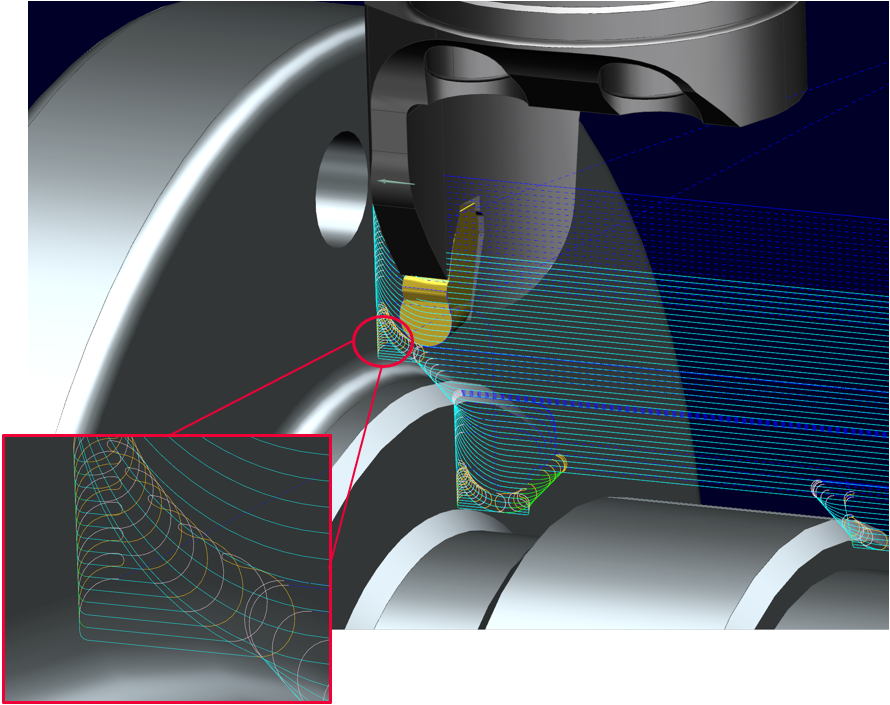
Beyond the main cutting path, tool engagement, retraction, and corner-cleaning movements are also optimized to help reduce impact on the cutting tool. This is particularly important when using ceramic inserts, which are relatively expensive and require stable cutting conditions.
With Rough Turn Adaptive integrated into the NX CAM ecosystem, programmers can combine this strategy with simulation tools, postprocessors, and machine setup configurations within the same workflow. This supports consistent data management from programming through production preparation.
Read more:
- How Is AI-Powered CAM Software Transforming CNC Machining?
- A Guide to Implementing CAM Software in Manufacturing
Overall, these enhancements help NX CAM 2606 reduce manual programming tasks, make better use of engineering time, and optimize toolpaths for different machining requirements.
Contact Vietbay – Siemens’ authorized distribution partner in Vietnam – for direct consulations