
2D CAD software is widely used in architecture, engineering, and mechanical design to create accurate drawings with clear dimensions and technical details. However, choosing the right software involves more than evaluating features. Businesses also need to consider compatibility, performance, usability, and licensing costs.
This article explores the differences between 2D CAD and 3D CAD, along with the key criteria businesses should consider when selecting 2D CAD software.
1. What Is 2D CAD Software?
CAD (Computer-Aided Design) is a computer-based design technology. 2D CAD software allows users to create and edit drawings on a two-dimensional plane, representing elements such as length, width, dimensions, shapes, and technical annotations.
2D CAD is widely used across industries, including:
- Architecture and construction: Creating floor plans, elevations, sections, and technical documentation.
- Mechanical engineering and manufacturing: Designing mechanical components, assembly drawings, and specifications for manufacturing.
- Electrical and engineering: Creating electrical schematics, system diagrams, and equipment layout drawings.
- Product design: Representing product dimensions, geometry, and technical requirements.
2. Differences Between 2D CAD and 3D CAD Software
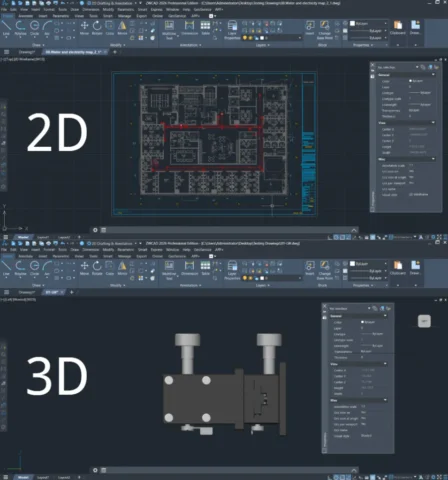
2D CAD is suitable for workflows primarily based on technical drawings and two-dimensional design documentation. In contrast, 3D CAD is useful when designers need to visualize products in three-dimensional space, evaluate geometry, or develop detailed 3D models.
The two technologies are not mutually exclusive. Businesses can use 2D CAD for drafting and documentation while incorporating 3D CAD when projects require more advanced modeling.
| Criteria | 2D CAD | 3D CAD |
| Visualization | Represents objects on a plane using length and width | Adds depth to represent objects in three-dimensional space |
| Applications | Technical drawings, floor plans, schematics, and design documentation | Product modeling, geometry checking, and design visualization |
| Cost and hardware | Typically requires lower investment and less demanding computer configurations | May require more powerful hardware and higher investment, depending on the solution |
| Information representation | Focuses on dimensions, lines, and technical details | Helps visualize the shape, structure, and spatial characteristics of objects |
3. Criteria for Choosing the Right 2D CAD Software
3.1. Identify Your Design Requirements
Each industry has different requirements for drawings and workflows. Architecture, mechanical engineering, construction, and electrical design all require tools that meet their respective accuracy and technical standards. Businesses should identify the types of drawings you commonly use, the complexity of their designs, and their data exchange requirements before selecting software.
3.2. Ease of Use
A familiar interface, intuitive operation, and customization capabilities can help users become productive more quickly. These factors also affect training time and the overall productivity of the design team.
For businesses migrating from another CAD platform, compatibility in terms of interface, commands, and workflows should also be considered.
3.3. Balance the Budget and Long-Term Costs
The cost of CAD software involves more than the initial license price. Businesses should also consider the licensing model, renewal costs, and potential expansion requirements.
It is important to evaluate the total cost over the software’s intended usage period, particularly when deploying CAD software across multiple engineers or design departments.
4. Why consider ZWCAD for 2D CAD?
4.1. Comprehensive Design Features and Intelligent Tools
In addition to essential CAD functions such as annotation, dimensioning, and drawing output, ZWCAD provides tools designed to streamline common design tasks.
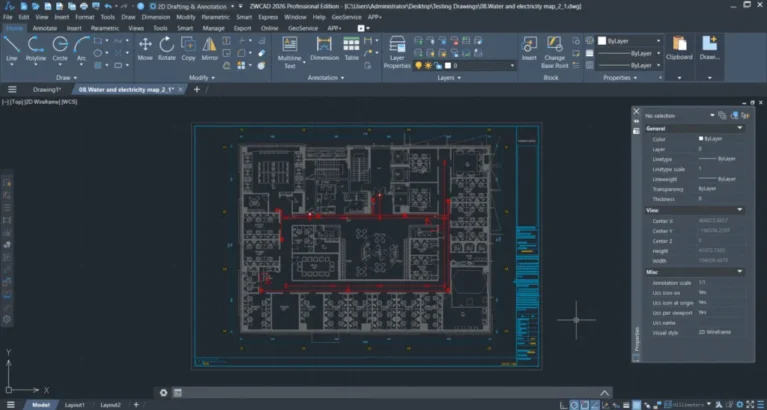
- Smart Match: Synchronizes properties between objects to reduce repetitive editing.
- Similar Part Search: Helps users find similar components within drawings.
- Parametric Design: Allows users to establish parametric relationships for controlling and modifying geometry.
4.2. Compatibility with Multiple CAD Data Formats
Data exchange is an important consideration when businesses work with customers, partners, or departments using different software platforms. ZWCAD supports importing and exporting various common formats, including DWG, DWT, DXF, JPG, PDF, PNG, IFC, and STEP, facilitating drawing sharing and collaboration throughout the design workflow.
4.3. Flexible Customization and Automation
ZWCAD supports user interface (UI) customization and application development through APIs such as LISP, VBA, .NET, and ZRX. This allows businesses to develop custom tools, automate repetitive tasks, and adapt the software to their internal design workflows.
4.4. Drawing Processing Performance
ZWCAD is designed to support 2D CAD drafting and design workflows. According to the source information, the software can process complex 2D drawings up to 1.98 times faster than AutoCAD.
Businesses should evaluate performance using their own drawing datasets and current hardware configurations to determine how well the software fits their workflows.
4.5. Optimize Costs with Perpetual Licensing
ZWCAD offers a one-time purchase licensing model, allowing long-term use subject to the terms of the selected license. This model can suit businesses looking for greater control over software investment and reduced reliance on recurring subscription fees.
For organizations with multiple CAD users, evaluating the number of licenses required, actual usage patterns, and upgrade policies can help determine an investment approach that fits the available budget.
Read more:
- What’s New in ZWCAD 2027 Beta? Major Upgrades for Improved CAD Design Performance
- ZWCAD Network License – A Cost-Effective Licensing Solution for Small and Medium-Sized Businesses
Conclusion
Choosing the right 2D CAD software requires businesses to consider their design requirements, compatibility, performance, and total cost of ownership. With a broad set of design tools, customization capabilities, support for multiple data formats, and a one-time purchase licensing model, ZWCAD is a solution businesses can consider for their 2D CAD workflows.
Contact Vietbay – Siemens’ official authorized distribution partner in Vietnam for direct consultations: