
Designcenter 2606, Siemens introduces a range of enhancements to the product design process, focusing on Sketch control, Pattern Feature operations, model editing, and surface creation.
These updates help engineers reduce editing operations, process models more efficiently, and maintain greater design accuracy throughout product development.
In this release, Siemens focuses on enhancing Sketch, Synchronous Modeling, and Advanced Shape Design, while improving the handling of models with complex geometry. These changes aim to deliver a faster, more stable, and more manageable design workflow.
Sketch trong Designcenter 2606 – Better Constraint Control
Sketch is the foundation of every 3D model. In Designcenter 2606, Siemens enhances how the system creates and manages geometric relations, giving users greater control when creating and editing sketches.
Persistent Relations are created and maintained as users draw geometry, drag curves, edit elements, or snap to points. Rather than allowing relations to change unexpectedly during these operations, the system maintains them more consistently, making sketch behavior more predictable and helping prevent unintended changes.
Users can also search for, display, and manage relations directly within the Sketch environment. During editing, the system prioritizes existing constraints instead of automatically creating additional relations.
These improvements make sketch updates more stable, particularly for models with numerous constraints or those that require repeated modifications. According to Siemens, the enhancements are intended to give users greater control and predictability when working with Sketch.
Pattern Feature: Expanded Support for Complex Designs
Pattern Feature in Designcenter 2606 expands support for dependent and editing features, allowing users to create repeated geometry more flexibly.
In addition to features supported in previous releases, version 2606 adds patterning support for Algorithmic Feature, Bounding Body, Trim Curve, Offset Region, and Delete Face.
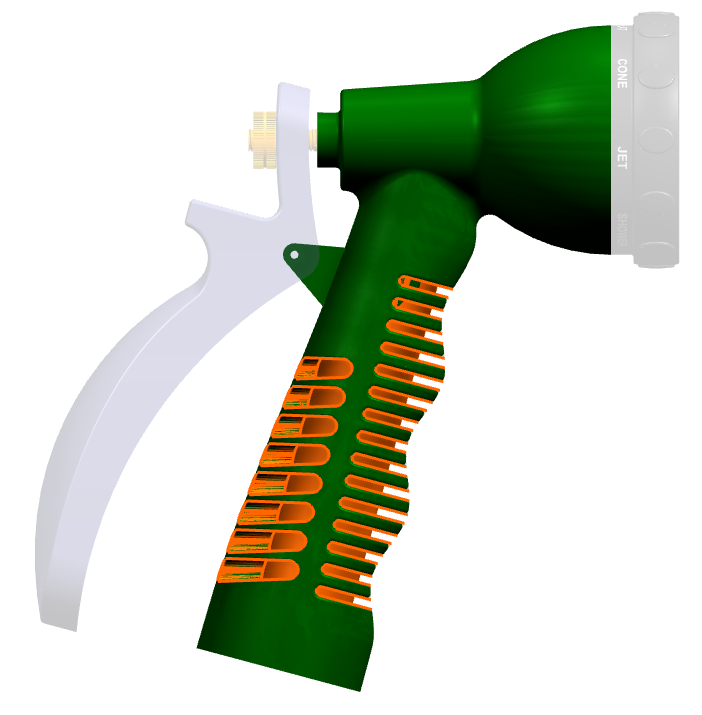
These enhancements are particularly useful when designing products with numerous repeated details or geometric variations. Instead of creating and editing each object individually, users can define a pattern to quickly build groups of features according to the intended design.
Synchronous Modeling: Faster Model Simplification
For CAE teams and engineers who need to simplify models before simulation, Designcenter 2606 improves the Delete Face command in Synchronous Modeling.
Users can delete faces across multiple bodies in a single operation. If some faces cannot be processed, the command continues with the valid faces and clearly identifies the faces that encountered errors.
This approach reduces the time required to simplify models containing multiple bodies or geometry imported from different CAD systems.
Sew & Combine: Faster Surface Model Processing
For models containing large numbers of surfaces, Designcenter 2606 improves the performance of the Sew and Combine commands.
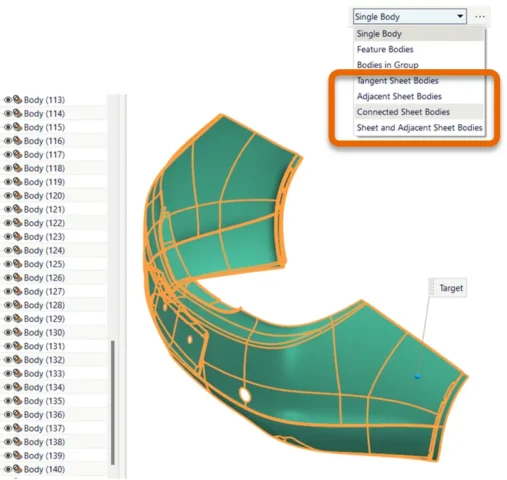
These improvements are especially beneficial when working with complex surface models, where large numbers of sheet bodies can significantly increase model processing and editing time.
Simplify Curve: More Accurate Curve Conversion
Simplify Curve has been enhanced to support the processing of complex spline curves. Users can convert splines into a series of circular arcs and straight lines while maintaining accuracy within a specified tolerance.
The tolerance can be defined directly in the command dialog, allowing users to control the degree of geometric simplification.
The improved algorithm also makes processing more stable and efficient. This feature can be useful in workflows that require geometry conversion for CNC machining or CAD data exchange with other systems.
Swept Surface: Control Surface Continuity with Continuity Constraints
Another notable enhancement in Designcenter 2606 is the ability to define Continuity Constraints directly within the Swept command.
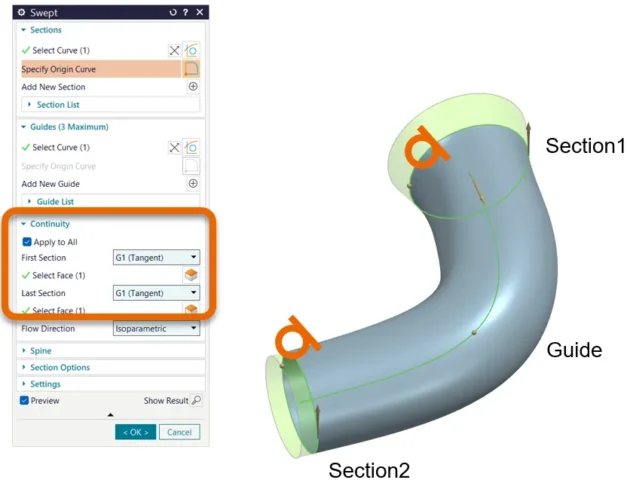
Users can control continuity conditions at the start or end of a surface during the Swept operation. This provides greater control over transitions between surfaces and helps produce geometry with continuity appropriate to the design requirements.
The feature is particularly useful for products that demand high surface quality, such as automotive components, consumer electronics, and medical devices, where surface shape and smoothness can directly affect design requirements and the final product.
Read more:
- Accelerate 3D Design with Synchronous Modeling in Designcenter NX
- Designcenter X Solid Edge: Flexible Design and Collaboration Anywhere
- Designcenter 2606 Mold Wizard: Improve Mold Design with the Latest Updates
Designcenter 2606 reinforces Siemens’ ongoing development of a modern, intelligent, and efficient product design platform. The new features help engineers improve design control, process geometry more efficiently, and reduce time spent on repetitive editing tasks.
Contact Vietbay – Siemens’ authorized distribution partner in Vietnam – for direct consulations