
Mold design requires precision, data reuse, and efficient workflows. With Designcenter 2606, Siemens focuses on improving parametric design, simplifying operations, and enhancing manufacturing readiness. Here are the key updates.
1. Designcenter 2606 optimizes the mold design workflow
1.1. Faster Cooling Channel Design
The Cooling system introduces new features that reduce the number of required steps:
- Direct Channel – Continuous Creation allows users to create multiple cooling channels consecutively within a single command without restarting the tool.
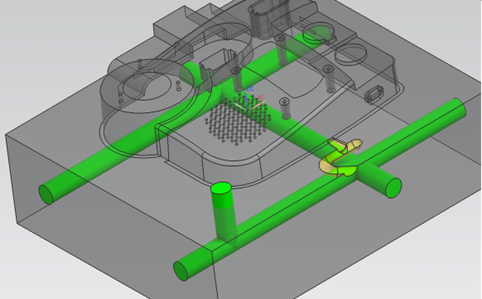
- Adjust Channel combines the Extend Channel and Connect Channels functions into a single dialog box, making it easier to extend, modify, and connect cooling channels.
1.2. Improved runner and plunger design
Version 2606 enhances the design of runner systems with several improvements:
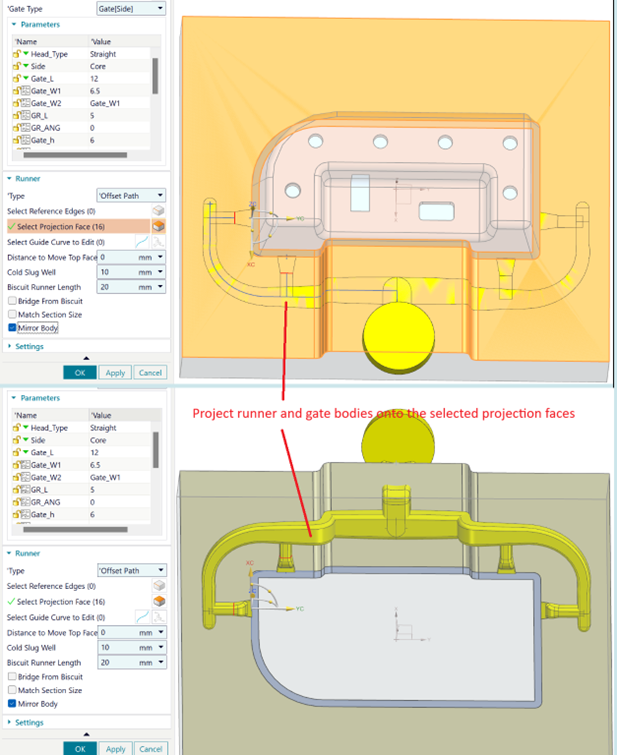
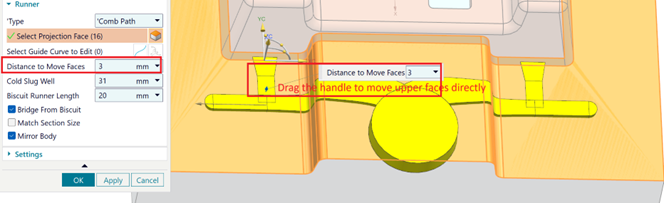
- Automatically project Runners and Gates onto selected surfaces and perform accurate subtraction operations with the Core, Cavity, or Mold Body.
- Support additional gate layout patterns.
- Flexibly adjust the surface offset distance to control material subtraction.
- Use reference edges to control the Runner path.
- Reuse Cold Slug Well objects instead of recreating the geometry.
1.3. More flexible vent design
Designcenter Mold Design 2606 expands the available Vent design options, including:
- Directly create vents on mold surfaces.
- Automatically connect to the nearest vent path.
- Move multiple vent segments simultaneously.
- Control whether vents are created automatically or individual points are placed manually.
These improvements give engineers greater flexibility when designing the venting system according to the requirements of different mold types.
2. Enhanced Parametric Design and Data Reuse
Designcenter Mold Design 2606 further expands its parametric design capabilities.
2.1. Bounding Body Supports Expressions
Users can directly use Expressions or Formulas to control the Offset distance of a Bounding Body. When design parameters change, the geometry is automatically updated without requiring manual modifications.
2.2. Mold CSYS – Reset Workpiece
The Reset Workpiece option provides greater control over workpiece position updates when the Mold CSYS coordinate system is changed. This helps prevent unintended movement and improves mold model stability.
2.3. Smarter Standard Part Management
The Standard Part library introduces new capabilities, including:
- Define parent-child relationships directly in the Spreadsheet.
- Predefine Reference Sets.
- Support lightweight 3D Wireframe models to improve display performance.
- Quickly switch between Wireframe and full standard models.
These improvements make it easier for engineers to manage and reuse standard components, particularly when working with large mold assemblies.
3. Improved BOM Management and Traceability
3.1. Better BOM Management and Traceability
Designcenter 2606 adds capabilities for managing mold data, including:
- Visual icons for BOM templates.
- Automatic recording of the last user who saved the data and the save timestamp.
- Synchronization of this information into BOM reports.
This allows companies to track changes and maintain clearer control over design information.
3.2. Automatic QR Code and Barcode Updates
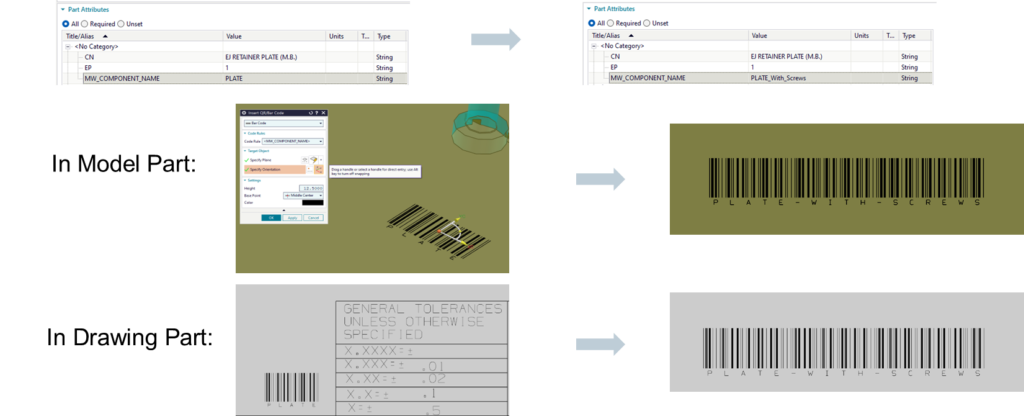
QR Codes and Barcodes can now be directly linked to component attributes. When product information changes, the codes are automatically updated in both the 3D model and 2D drawing. This capability helps maintain data consistency and improves traceability throughout the manufacturing process.
Designcenter Mold Design 2606 focuses on reducing manual operations, increasing automation, and improving data management throughout the mold design workflow. Improvements to cooling channels, Runners, Gates, and Vents help engineers design more efficiently, while parametric design, Standard Part libraries, BOM management, and QR Codes support data reuse, change control, and greater manufacturing readiness.
Contact Vietbay – Siemens’ official authorized distribution partner in Vietnam for direct consultations