
Mold design always demands absolute precision, flexible data reusability, and an optimized workflow.
In the Designcenter 2606 version, Siemens continues to focus on three core objectives: enhancing parametric design, optimizing workflows, and improving readiness for manufacturing.
Let’s explore the enhancements in the Mold Wizard toolset with Vietbay in the article below.
1. Designcenter 2606 Enables Faster Design and Minimizes Operations
1.1. High-Speed Cooling System
The Cooling system in the new version has been significantly improved with various features that help engineers minimize operational steps:
-
Direct Channel – Continuous Creation: Allows the continuous creation of multiple cooling channels in a single command execution, completely eliminating the need to restart the tool after each channel. This feature is particularly effective when designing complex cooling systems.
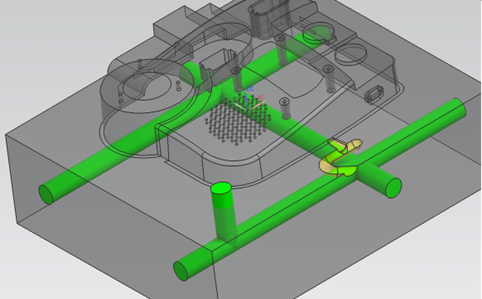
- Adjust Channel: Neatly integrates both the Extend Channel and Connect Channels functions into a single dialog box. Users can now easily edit, extend, or connect cooling channels seamlessly without having to switch back and forth between multiple commands.
1.3. Automation Improvements for Runner and Plunger
Version 2606 elevates the design capabilities of the runner system with a series of upgrades:
-
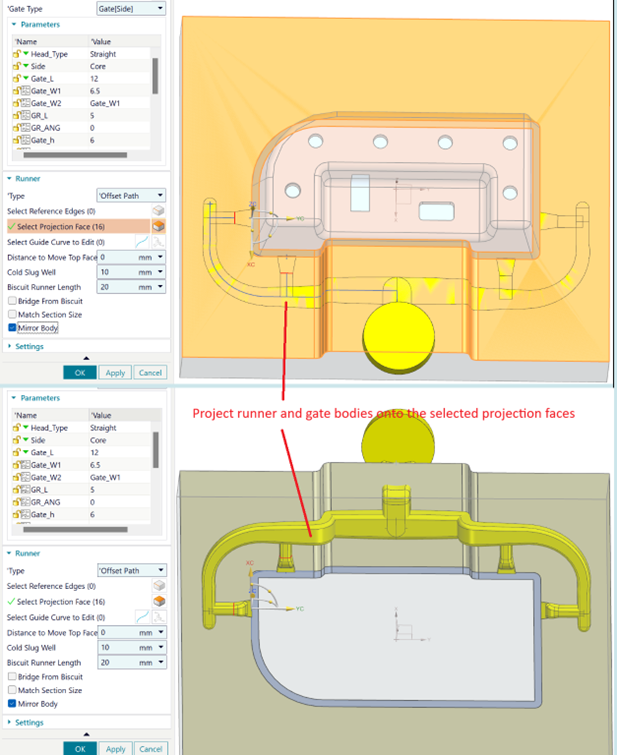
Auto-project: The Runner and Gate can be automatically projected onto the specified surface and perform an accurate volumetric subtraction with the Core, Cavity, or Mold Body components.
-
Adds multiple options for Gate layouts.
-
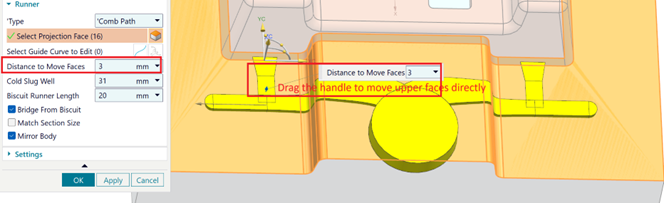
Flexibly controls the surface Offset distance to ensure a perfect material subtraction process.
-
Allows the use of reference edges to direct the Runner path, while also supporting the reuse of Cold Slug Well objects instead of wasting time rebuilding the geometry from scratch.
1.3. More Flexible Vent Layouts
The Vent creation function is expanded to accommodate various injection mold design methods:
- Supports creating vents directly on the mold surface.
- Automatically calculates and connects to the nearest vent line.
- Allows simultaneous movement of multiple vent segments.
- Supports flexible control between automatic vent creation or manually placing individual points as desired.
The layout of the venting system now becomes faster and more easily customizable for different types of molds.
2. Parametric Modeling Upgrades in Designcenter 2606
Designcenter 2606 continues to consolidate its leading position in parametric design capabilities.
2.1. Bounding Body Supports Expressions
Users can directly use Expressions or Formulas to control the Offset parameter of the Bounding Body. When the original design parameters change, the entire geometry will automatically update instantly without the need for manual editing.
2.2. Mold CSYS – Reset Workpiece
Adds the Reset Workpiece option – helping strictly control the updating of the workpiece position whenever there is a change in the Mold CSYS coordinate system. This eliminates unintended shifts and ensures stability throughout the mold building process.
2.3. Smarter Standard Part Library Management
The Standard Part library is upgraded with powerful automation capabilities:
-
Directly declare Parent-child relationships right within the Spreadsheet.
-
Pre-configure specialized Reference Sets.
-
Supports displaying ultra-lightweight 3D Wireframe models to boost graphics loading speed, allowing instant switching between Wireframe and standard solid models (Full model) when needed.
3. Enhanced Model Management and Traceability
3.1. Strict BOM Control and Traceability
Version 2606 brings various tools to help businesses optimize data flow:
-
Displays intuitive, easily recognizable icons for BOM report templates.
-
The system automatically records the last person to save the file and the save time.
-
Synchronizes all information directly into the exported BOM report.
This helps management easily track progress, control revision history, and ensure transparency within the project.
3.2. Automatic QR Code and Barcode Updates
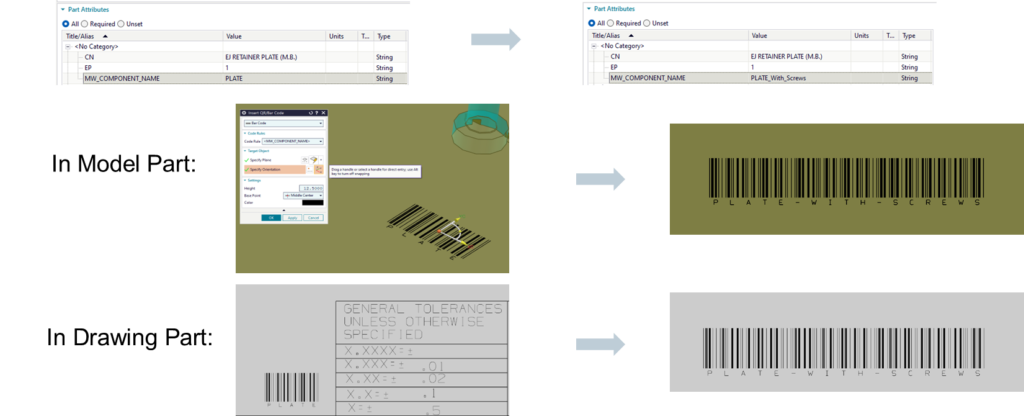
QR Codes or Barcodes can now directly link to the attributes of the design part. Whenever product information is modified, the barcode system will automatically and synchronously update on both the 3D model and the 2D technical drawing.
This serves as the foundation for rapid traceability in a digital manufacturing environment.
Designcenter Mold Design 2606 does not merely add new features, but also focuses on the user experience by minimizing redundant operations, increasing the level of automation, and optimizing data management.
The upgrades in the cooling system, Runner, Vent, Standard Part, or BOM will help the mold design team complete projects faster and with greater accuracy within the digital manufacturing workflow.
Read more:
- Optimizing Mold Design from the Concept Stage
- Designcenter 2606 Mold Wizard – Accelerate mold design with new enhancements
Contact Vietbay today to get direct consultation from our expert team on solutions tailored to your business needs.