
How a Design Decision Can Affect the Cost of an Entire Mold
In product and mold development, the later a problem is discovered, the more expensive it typically becomes to resolve. During the concept stage, modifying a geometric feature may take only a few minutes.
However, once the design is finalized, the mold has been manufactured, or the product has entered testing, companies may face multiple rounds of:
Design Modification → Mold Modification → Mold Trial → Evaluation → Rework
This is why simulation should not be used only at the end of the process to validate a completed design. Its greater value lies in providing engineers with the information they need to make decisions while the design is still relatively easy to modify.
Bringing Simulation into the Design Stage
With its Simulation-Driven Design approach, Simcenter Inspire brings simulation, optimization, and manufacturability assessment closer to designers in an environment similar to CAD.
According to Siemens, Inspire supports concept exploration, performance validation, and manufacturability assessment early in the design process. Rather than completing the CAD model before moving to CAE, engineers can use simulation insights while developing and refining their designs.
For mold-making and manufacturing companies in particular, the Inspire ecosystem extends to a range of applications, including Die Casting, Plastic Injection Molding, Sheet Metal Forming, Extrusion, PolyFoam, and 3D Printing.
What Is Inspire Manufacturing?
Inspire Manufacturing can be understood as an approach that uses the Inspire ecosystem to integrate manufacturing simulation into the design development process.
Instead of following the traditional workflow:
Design → Complete CAD → Transfer to CAE → Simulate → Identify Issues → Return to Design
companies can move toward a more integrated process:
Concept → Design → Simulation → Manufacturability Assessment → Optimization → Finalization
The key difference lies in when simulation is used. The goal is not simply to run more simulations, but to incorporate manufacturability insights into design decisions as early as possible.
Designing with Manufacturing in Mind from the Start
A product may meet its functional requirements without necessarily being suitable for manufacturing.
For mold design, engineers need to consider multiple factors simultaneously, including:
- Product geometry
- Formability
- Material flow
- Filling capability
- Shrinkage and deformation
- Springback
- Demolding capability
- Mold layout and system design
- Process conditions
- Material reduction opportunities
- Manufacturing costs and lead times
If these factors are assessed only when the design is nearly complete, companies may face repeated trial-and-adjustment cycles. Inspire brings these manufacturing considerations earlier into the product development process.
This aligns with Siemens’ Simulation-Driven Design approach, which combines geometry modeling, generative design, and manufacturing simulation to support design decisions before moving deeper into production.
An Ecosystem for Multiple Mold and Manufacturing Applications
A key advantage of Inspire Manufacturing is not a single module, but its ability to extend across different manufacturing processes.
1. Inspire Cast: Die Casting Simulation
For manufacturers of cast components, discovering defects after the mold has been built can lead to significant additional costs and delays.
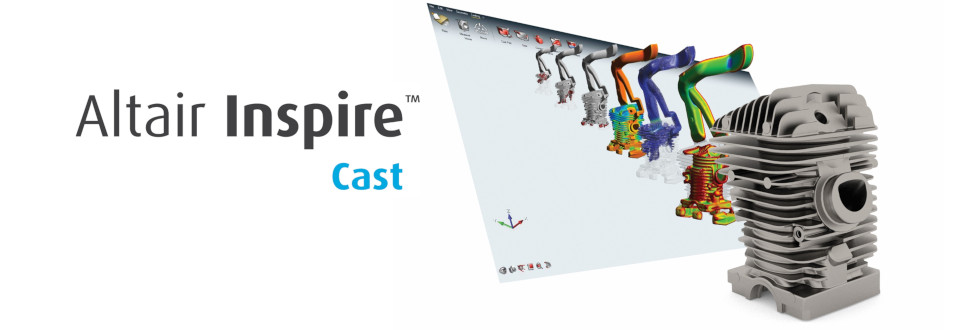
Inspire Cast supports virtual testing, validation, correction, and optimization of casting designs. The software provides guided workflows for simulating various casting methods, including Gravity Die, Gravity Sand, Investment Casting, High Pressure Die Casting, Low Pressure Die Casting, and Tilt Pouring.
Inspire Cast is designed to be used early in the component design cycle, helping reduce iterations between design and manufacturing. Its geometry-centric approach also enables physical simulation to be combined with machine learning when evaluating designs.
Business value
Instead of asking only, “Will this casting mold work?”, designers can ask an earlier and more useful question: “How should this component design be modified to increase the likelihood of a successful casting process?”
This is the difference between using simulation to validate a design and using simulation to guide design decisions.
2. Inspire Mold: Plastic Injection Molding Simulation
For plastic products, product design and mold design are closely interconnected. A geometry optimized for functionality is not necessarily suitable for the injection molding process.
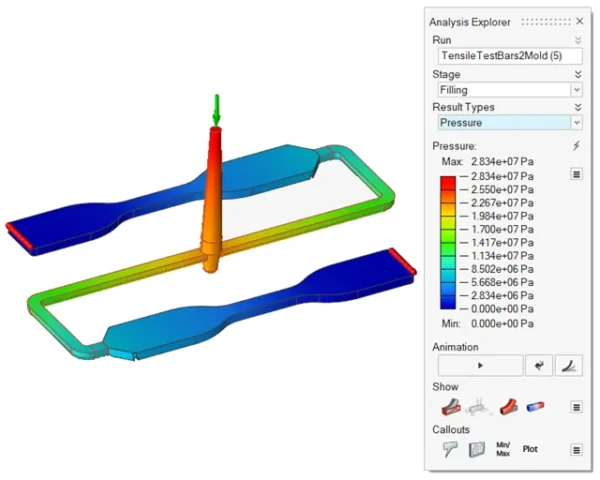
Inspire Mold provides a Simulation-Driven Design environment for checking, validating, correcting, and optimizing product or mold designs from the early stages.
Integrating simulation early allows engineers to assess manufacturability issues before proceeding to mold fabrication and physical trials.
3. Inspire Form: Sheet Metal Forming Simulation
For stamped and formed sheet metal components, the final shape is only one part of the design challenge. Manufacturers must also assess:
- Can the component be formed successfully?
- Is the material at risk of thinning or wrinkling?
- Is there a risk of splitting?
- Will springback affect dimensional accuracy?
- What should the blank geometry look like?
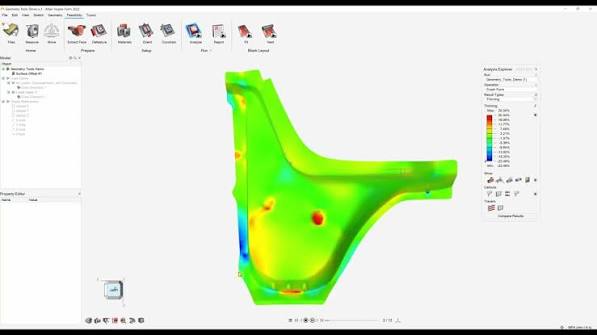
Inspire Form supports formability assessment, material utilization analysis, die face design, process simulation, and virtual tryout. Evaluating formability early helps engineers identify potential issues before physical mold trials, reducing reliance on repeated trial-and-error to determine the cause of defects.
4. Beyond Die Casting, Plastic Molding, and Forming
The Inspire ecosystem also extends to other manufacturing solutions, including:
- Inspire Extrude Metal – metal extrusion simulation
- Inspire Extrude Polymer – polymer extrusion simulation
- Inspire PolyFoam – polyurethane foam simulation
- Inspire 3D Print – support for evaluating and optimizing 3D printing processes
- Other design, rendering, and simulation tools within the Inspire ecosystem
This provides an advantage for companies working with diverse products and manufacturing processes. Rather than developing a completely separate approach for every application, they can address multiple manufacturing challenges within the same ecosystem.
Bringing Simulation Closer to Designers
One of the barriers to CAE adoption in manufacturing companies is the gap between Designers and Simulation Engineers. In traditional simulation workflows, engineers often need to perform several specialized tasks, including geometry preparation, model setup, mesh generation, solver execution, and results processing.
Inspire is designed with designers in mind, bringing simulation and computational physics into an intuitive environment that resembles the CAD workflow. Its embedded solvers also help automate or reduce some of the work associated with meshing.
This is particularly valuable during the concept stage. Designers do not necessarily need to become CAE experts to use simulation. Instead, simulation can become a practical tool for evaluating and selecting design alternatives.
Optimizing Designs While Ideas Are Still Taking Shape
This is one of the most important benefits of Simulation-Driven Design.
When simulation is performed too late:
- Design changes become more expensive.
- Multiple iterations may be required.
- Geometry becomes harder to modify.
- Risks may emerge during mold trials.
When simulation is introduced early:
- More design alternatives can be explored.
- Geometry is easier to adjust.
- Design and testing iterations can be reduced.
- Manufacturability can be assessed before tooling begins.
Inspire combines modeling, optimization, and simulation in one environment to support concept exploration and manufacturability assessment throughout the design process.
Altair Units: Flexible Access to Multiple Modules Through a Shared License Pool
Beyond simulation capabilities, another consideration when investing in engineering software is that usage requirements can vary from project to project.
One project may require Die Casting, another may need Plastic Injection Molding, while a different team may need Forming capabilities. If each requirement is tied to a separate license, companies may end up with licenses that are not used continuously.
The Altair Units licensing model is designed around a shared pool of Units that can support multiple applications across the Altair ecosystem. Inspire applications such as Inspire Cast, Inspire Mold, Inspire Form, and other solutions can use the corresponding license features or Units.
Some features can also check out Units while in use and check them back in when they are no longer needed.
What Does This Mean for Businesses?
Instead of thinking, “Buy one license for each application,” companies can consider a different approach: “Build a shared pool of Units and allocate them according to actual demand.”
This model allows businesses to use the ecosystem according to changing project requirements, rather than making separate fixed investments for every application.
Maximizing ROI from Engineering Software Investments
The value of an engineering solution lies not only in its computational capabilities, but also in how effectively a company can use those capabilities in practice.
By combining Inspire with Altair Units, businesses can work toward the following benefits:
- Expand access to simulation: Designers can participate earlier in simulation workflows and use the results to support design decisions.
- Address more types of engineering problems: Die Casting, Mold, Forming, Extrusion, and other manufacturing processes can be explored within the same ecosystem.
- Reduce design iterations: Issues can be identified while designs are still relatively easy to modify, rather than waiting until tooling or testing.
- Reduce dependence on physical trials: Simulation helps screen and evaluate alternatives before proceeding to physical processes.
- Use licenses more flexibly: Units can be allocated according to the needs of different teams and projects.
Which Companies Can Benefit from Inspire Manufacturing?
The solution is particularly relevant to companies developing and manufacturing:
- Die casting molds
- Plastic injection molds
- Stamping dies and sheet metal forming tools
- Metal castings
- Plastic products
- Stamped components
- Extruded products
- Products requiring design optimization for manufacturability
- Products for which simulation needs to be more accessible to design teams
It is especially relevant for companies experiencing challenges such as:
- Repeated design iterations before meeting requirements
- Multiple mold trials
- CAE analysis performed only when the design is nearly complete
- Designers relying heavily on CAE engineers
- A diverse range of mold types and manufacturing processes
The Future of Mold Design: Simulation and the Development of AI
Advances in AI and new simulation methods continue to change how engineers use CAE.
In Simcenter Inspire 2026.1, Siemens introduced additional AI-based workflows. PhysicsAI can be trained using existing simulation data and used to predict results for new geometries. This approach helps teams evaluate design changes earlier and extends to applications such as Cast, Mold, Form, and Extrude.
This development illustrates how simulation is increasingly becoming part of the design process, rather than serving only as a final validation step.
Inspire Manufacturing Brings Simulation Earlier into the Design Process
Concept → Design → Simulation → Optimization → Manufacturing Feasibility → Production
With solutions for Die Casting, Plastic Mold, Forming, Extrusion, and other manufacturing processes, Inspire supports an approach in which manufacturability is considered from the beginning of the design process.
Combined with the Altair Units licensing model, it also gives companies more flexibility in allocating software capabilities according to project requirements and actual usage.
Read more:
- Simulation-Driven Design Solutions for Optimizing Manufacturing Processes
- Increasing ROI in Stamping Dies and Automotive Body Stamping Lines
FQA about Inspire Manufacturing
|
1. Is Inspire suitable for designers? Yes. Siemens positions Simcenter Inspire as a CAE tool for designers, offering an intuitive environment and integrated solvers that help simplify simulation workflows. 2. Can Inspire simulate die casting? Yes. Inspire Cast supports the simulation and optimization of various metal casting processes, including High Pressure Die Casting and Low Pressure Die Casting. 3. Can Inspire simulate plastic injection molding? Yes. Inspire Mold supports Simulation-Driven Design for plastic injection-molded components and molds. 4. Does Inspire support sheet metal forming? Yes. Inspire Form supports formability assessment, material utilization, die face design, process simulation, and virtual tryout. 5. What are Altair Units used for? Altair Units is a unit-based licensing model that allows applications across the ecosystem to use the corresponding license features from a shared pool of Units. The number of Units required depends on the application and the functionality being used. |
Contact Vietbay – Siemens’ official authorized distribution partner in Vietnam – for direct consulations