
In CNC machining, errors in NC code or toolpaths can require program adjustments directly at the machine, prolong production preparation time, and increase the risk of incidents.
CIMCO Edit helps programmers address these challenges through NC code editing, program comparison, toolpath visualization, and machining simulation tools. By checking programs on a computer, users can identify issues that need further review before moving to actual production.
From September 1, 2026, CIMCO officially introduced two new product tiers, CIMCO Edit Core and CIMCO Edit Ultra, replacing the previous CIMCO Edit Standard and CIMCO Edit Professional versions.
1. CIMCO Edit Core – NC Editing and Toolpath Verification
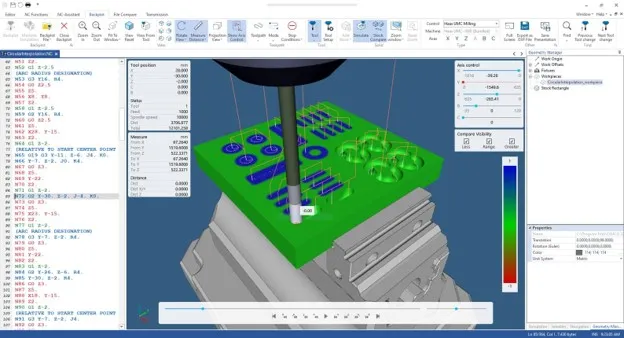
For businesses that primarily needNC Editing and Toolpath Verification to edit NC code, manage program versions, and review toolpaths, CIMCO Edit Core provides a set of tools for everyday CNC programming tasks. It is the successor to CIMCO Edit Standard, combining NC editing functions with full Backplot capabilities.
Key features:
- NC program editing: Supports block numbering, search and replace, and adjustments to spindle speed and feed rate.
- Program comparison: The File Compare tool identifies differences between NC code versions, helping users control changes when updating programs.
- Toolpath visualization: Backplot displays tool movements based on the NC program, allowing programmers to review machining sequences and identify areas requiring further inspection.
- Program analysis: Toolpath statistics tools help evaluate programs before they are transferred to CNC machines.
- Programming workflow support: Features such as NC Assistant, Macro, and multi-channel editing and display support program editing, review, and processing requirements.
With these capabilities, CIMCO Edit Core is suitable for businesses that need to standardize NC code editing and verification while visualizing toolpaths without requiring the advanced material simulation and verification tools available in Ultra.
2. CIMCO Edit Ultra – Advanced 3D Simulation and Machining Verification
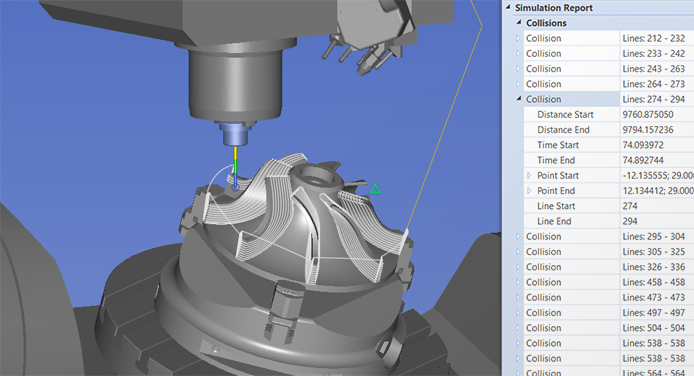
For more complex CNC programs, simply viewing toolpaths may not be sufficient to evaluate material removal or identify potential collision scenarios. CIMCO Edit Ultra addresses these more demanding verification needs by building on Core’s functionality and extending simulation and program verification capabilities.
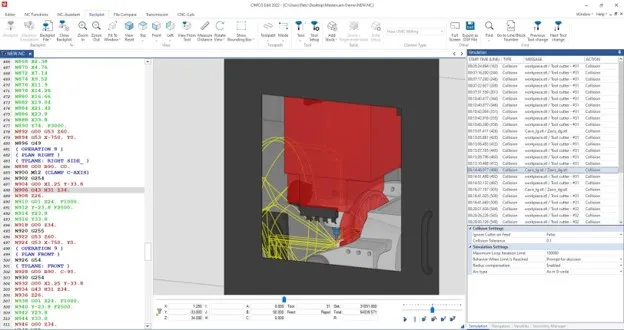
Ultra is the successor to CIMCO Edit Professional. It integrates high-performance GPU-accelerated material simulation and retains CAM functionality from the Professional version. It also adds advanced verification capabilities that were previously available only through the Machine Simulation Add-on.
Key features:
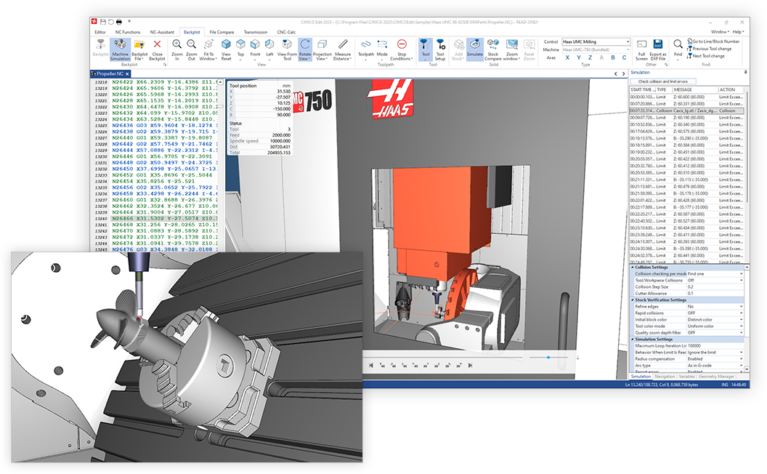
- 3D material removal simulation (Solid Simulation): Displays the process of removing material from the stock, allowing users to visualize the expected machining results.
- Collision detection reporting: Supports collision checks between the tool, stock, and fixtures during simulation.
- Enhanced safety checks: Helps identify scenarios such as rapid movements into the stock (rapid-to-stock) and tool holder collisions with the stock (holder-to-stock).
- Over-travel limit reporting: Detects movements that exceed defined machine travel limits.
- Advanced stopping conditions: Allows users to configure simulation to stop when events requiring inspection occur, such as collisions or travel limit violations.
- Additional verification tools: Supports post-machining stock comparison (Stock Compare), cross-section viewing, and detailed toolpath inspection through integrated functions.
These features help programmers verify programs on a computer before production, particularly when evaluating material removal and risks associated with tool movements.
It is important to note that collision simulation and reporting in CIMCO Edit Ultra are not equivalent to full CNC machine simulation. If a business needs to simulate the entire machine using detailed 3D models of the machine body, tool head, table, and moving components, it can consider the CIMCO Machine Simulation Add-on based on its requirements and configuration.
3. How Does the Transition from Standard and Professional Work?
From September 1, 2026, CIMCO transitioned from the two-tier Standard and Professional structure to Core and Ultra.
- CIMCO Edit Standard → Core: Continues to support NC program editing, file comparison, and toolpath visualization.
- CIMCO Edit Professional → Ultra: Inherits Core’s functionality and extends it with 3D material simulation, collision detection, and advanced verification capabilities.
4. Do Existing Customers Need to Repurchase Their Licenses?
According to the official announcement from CIMCO:
- Customers currently using CIMCO Edit Standard automatically qualify to use CIMCO Edit Core.
- Customers currently using CIMCO Edit Professional automatically qualify to use CIMCO Edit Ultra.
To use the new features, customers need to install the latest version of CIMCO Edit according to the supplier’s instructions. Therefore, existing users do not need to complete a separate license upgrade procedure. However, before updating, businesses should reconfirm their current version, license status, and update entitlements with their reseller to ensure the transition is appropriate for their actual circumstances.
5. CIMCO Edit Core vs. CIMCO Edit Ultra: Feature Comparison
The table below summarizes the key differences between the two editions based on CIMCO’s official feature comparison chart.
Note: This table focuses on the main differences between Core and Ultra. Features that depend on add-ons, configuration, and usage entitlements may need to be confirmed against the actual license package.
6. Should You Choose CIMCO Edit Core or Ultra?
The choice depends on the level of verification required before an NC program is transferred to a CNC machine.
CIMCO Edit Core is suitable for businesses that:
- Primarily edit and compare NC program versions.
- Need to use Backplot to review toolpaths.
- Want to standardize programs before transferring them to CNC machines.
- Do not yet require 3D material removal simulation or advanced verification.
CIMCO Edit Ultra is suitable for businesses that:
- Need to simulate 3D material removal.
- Want to check for collisions between tools, stock, and fixtures.
- Need alerts for movements that exceed machine travel limits.
- Want to increase the level of program verification before actual machining.
Read more:
- Comprehensive CIMCO Solutions for Smart CNC Machining – Connecting, Controlling, and Optimizing the Entire Workshop
- Machining Simulation with 3D CNC Machine Models in CIMCO
- CNC Machine Simulation with CIMCO Machine Simulation Software
About us
Vietbay provides software solutions and digital engineering services in Vietnam, including consulting, implementation, and after-sales technical support for engineering design and simulation solutions. Contact Vietbay for detailed consultation.