
Through the AI Agent model, users can now convert design requirements into engineering operations such as 3D modeling, part modification, Assembly management, and drawing creation. Join Vietbay to explore how this technology can be applied in design and manufacturing in the following article.
1. The Next Evolution of CAD: AI That Can Directly Interact with Engineering Software
In mechanical design and manufacturing, Siemens NX is one of the most powerful integrated CAD/CAM/CAE platforms. It provides a comprehensive API framework that enables developers to extend its capabilities, automate engineering workflows, and build custom applications.
Traditionally, developing automation applications for NX requires programming knowledge and experience with NX Open, using languages such as Python, C#, VB.NET, or C/C++ to implement operations including geometry creation, model modification, assembly management, drawing generation, and engineering data export.
The emergence of advanced AI models such as Anthropic’s Claude, combined with MCP (Model Context Protocol), introduces a new approach to CAD automation.
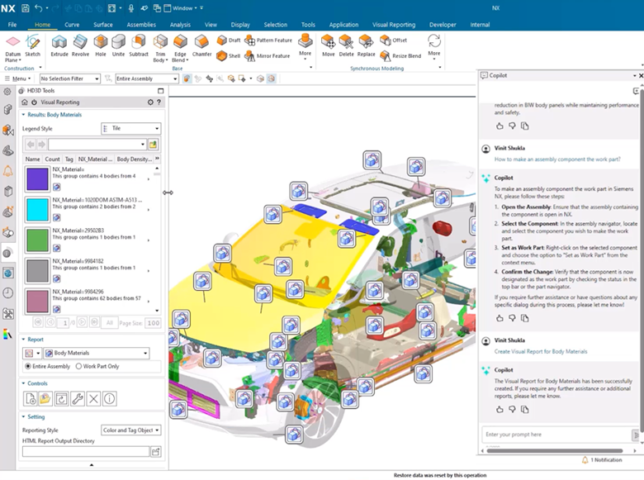
Instead of manually writing code or executing repetitive operations, engineers can interact with NX using natural language. AI can interpret engineering requirements, identify the appropriate tools, generate or select the necessary commands, and orchestrate the execution of operations directly within NX.
For example, engineers can simply request:
- Create a stepped shaft with specified dimensions.
- Automatically generate holes, fillets, chamfers, and other geometric features.
- Analyze Assembly structures and generate a Bill of Materials (BOM).
- Automatically create 2D engineering drawings from 3D models.
- Check dimensions, mass properties, and geometric attributes.
- Develop customized design applications based on company-specific engineering standards.
The key advantage is that AI does not simply generate source code. Through MCP, it can invoke predefined tools, receive execution results, evaluate the output, and continue coordinating subsequent operations until the requested task is completed.
2. 3 Core Technologies Behind the Integration
2.1. Claude AI – The Intelligence and Orchestration Layer
Claude acts as the AI Agent, receiving user instructions and translating natural language into technical operations.
For example, when a user requests:
“Create a cylindrical part with a diameter of 50 mm and a length of 100 mm, drill a through-hole with a diameter of 12 mm, and chamfer both ends.”
Claude can perform the following steps:
- Interpret the engineering requirements and identify the geometric parameters.
- Determine the appropriate modeling sequence in NX.
- Select the corresponding tools exposed by the MCP Server.
- Send the required parameters to NX Open.
- Receive execution results and check the operation status.
- Continue with subsequent operations or report completion.
Claude can be accessed through Claude Desktop, Claude Code, or API integration, depending on the application architecture.
2.2. Siemens NX Open – The Programming and Execution Platform
NX Open is a comprehensive API framework that allows developers to access and control Siemens NX functionality.
Supported programming languages include:
- Python.
- C# and VB.NET.
- C/C++.
- Java.
Through NX Open, applications can interact with a wide range of NX objects and engineering functions.
| Functional area | Automation capabilities |
| Part Modeling | Create sketches, extrusions, revolutions, holes, fillets, and chamfers |
| Assembly | Create, modify, and manage assembly structures |
| Drafting | Generate drawings, views, dimensions, and annotations |
| Measurement | Measure dimensions, volume, surface area, and mass properties |
| Data Management | Open, save, manage, and export engineering data |
| CAM | Automate selected manufacturing programming workflows through supported APIs |
| Custom Applications | Develop dedicated engineering applications and user interfaces |
An important advantage is that NX Open applications can be developed as standalone programs or integrated directly into the NX environment, depending on the deployment approach.
This means AI does not need to control every operation through mouse clicks and keyboard interactions. Instead, it can invoke structured API functions directly, making automation more reliable, consistent, and easier to maintain.
2.3. MCP – The Bridge Between Claude and Siemens NX
MCP (Model Context Protocol) is an open protocol introduced by Anthropic to standardize how AI applications connect to external tools and data sources.
The concept can be understood as follows:
- Claude AI acts as the intelligence layer, analyzing requirements and making decisions.
- NX Open provides the execution capabilities for engineering operations.
- MCP provides the communication protocol connecting these components.
The MCP Server defines the tools that Claude is allowed to access and execute.
For example, an MCP Server designed for Siemens NX could expose the following tools:
- create_sketch: Create a sketch.
- create_extrude: Generate an extruded solid.
- create_hole: Create holes.
- create_fillet: Apply fillets.
- get_part_info: Retrieve part information.
- get_body_properties: Retrieve geometric properties.
- export_step: Export STEP files.
- create_drawing: Generate engineering drawings.
These tools are examples of a custom MCP interface, not built-in functions officially provided by Siemens.
The main advantage of MCP is standardized connectivity. Once a suitable MCP Server is available, Claude can access predefined NX Open functions without needing to understand the entire internal programming structure of Siemens NX.
3. Integration Architecture: Claude – MCP – NX Open
An AI-powered NX control system can be designed using the following architecture:
Overall workflow:
User → Claude AI → MCP Client → MCP Server → NX Open Bridge → Siemens NX.
The process works as follows:
- The user submits a request in natural language.
- Claude interprets the request and determines which tools are required.
- The MCP Client sends the request to the MCP Server.
- The MCP Server validates the parameters and forwards the request to the NX Open Bridge.
- NX Open executes the operation within the Siemens NX environment.
- The execution results are returned to the MCP Server.
- Claude receives the results, evaluates them, and performs additional operations if necessary.
Several community projects have already explored similar architectures, using an MCP Server together with a bridge running inside NX to execute NX Open commands. This approach is more practical than relying exclusively on AI to control the entire graphical interface through mouse and keyboard operations.
4. Practical Applications of AI-Powered NX Automation
4.1. Automatically Generate 3D Models Using Natural Language
This is one of the most straightforward applications of integrating Claude with NX Open. Users describe the part they want to design, and Claude interprets the parameters and invokes the corresponding MCP tools.
For example:
“Design a flange with an outer diameter of 120 mm, an inner diameter of 50 mm, a thickness of 15 mm, and four bolt holes with a diameter of 10 mm, equally distributed on a 90 mm pitch circle diameter.”
The automated workflow includes:
- Define the coordinate system and sketch plane.
- Create the flange profile.
- Generate the solid using Extrude.
- Define the pitch circle and hole positions.
- Create the four bolt holes.
- Validate the geometry and save the part.
Suggested illustration: Claude AI automatically generating a 3D flange model inside Siemens NX.
4.2. Develop Automated Design Applications Based on Company Standards
Manufacturing companies frequently design repetitive components with dimensions that vary from one order to another. Instead of redesigning each component manually, companies can develop NX Open applications integrated with Claude to automate the entire process.
For example: an automated shaft design application.
Users only need to provide:
- Shaft diameters for each section.
- Lengths of individual sections.
- Keyway positions.
- Thread specifications.
- Other engineering requirements.
Claude analyzes the input parameters, invokes the corresponding modeling functions, and generates the complete 3D model. More importantly, company-specific engineering rules can be integrated into the application to validate design conditions before execution.
4.3. Automated Assembly Design and Analysis
For assemblies containing multiple components, AI can assist with:
- Reading existing Assembly structures.
- Retrieving component information.
- Analyzing assembly relationships.
- Adding new components according to user requirements.
- Defining assembly constraints.
- Checking geometric conditions and potential interferences.
For example, a user can request:
“Analyze the current Assembly, identify components that are not fully constrained, and list locations with potential interference issues.”
Claude can invoke tools to inspect the assembly structure, retrieve component data, and perform geometric checks implemented through NX Open.
4.4. Automated Engineering Drawing Generation
AI can support the automated generation of engineering drawings directly from 3D models.
Typical operations include:
- Creating drawing sheets using predefined paper sizes.
- Generating orthographic views.
- Creating isometric views.
- Adding dimensions.
- Inserting symbols and annotations.
- Exporting drawings to PDF and other supported formats.
Companies can also integrate drawing templates, title blocks, drafting standards, and internal naming conventions.
4.5. Building an AI Engineering Assistant for NX Users
This is one of the most valuable long-term applications.
Instead of using Claude only to generate 3D models, companies can develop a dedicated NX Engineering Assistant capable of:
- Retrieving information about objects in a Part.
- Explaining Feature Tree structures.
- Analyzing geometric parameters.
- Checking design rules.
- Helping identify and troubleshoot errors.
- Automatically performing repetitive engineering tasks.
The system can be further enhanced by integrating NX Open documentation, internal engineering standards, component libraries, and company-specific technical procedures. This creates a specialized AI assistant that understands the engineering environment and supports real-world design activities.
5. Practical Example: Using Claude to Create a Part in NX
Assume that the company has already developed an MCP Server providing tools for Sketch creation, Extrude, Hole operations, and Part saving.
The user submits the following request:
“Create a rectangular block 100 x 60 x 20 mm, add four holes of diameter 8 mm at each corner, and save the part as Base_Plate.prt.”
Claude translates this request into a sequence of structured operations.
| Step | MCP Tool | Expected result |
| 1 | create_sketch | Create a rectangular sketch |
| 2 | create_extrude | Generate a 3D solid with a thickness of 20 mm |
| 3 | create_hole | Create four holes with an 8 mm diameter |
| 4 | inspect_body | Validate the resulting geometry |
| 5 | save_part | Save the NX part file |
Example of a structured request that the MCP Server could receive:
{
“tool”: “create_extrude”,
“parameters”: {
“width”: 100,
“height”: 60,
“depth”: 20,
“unit”: “mm”
}
}
This is an illustrative example of a custom tool interface, not the direct calling syntax of NX Open.
An important capability is that Claude can execute multiple tool calls sequentially, using the output of each operation to determine the next action. As a result, users can submit one overall engineering requirement rather than manually controlling every individual command.
6. From Basic Automation to Specialized AI Agents
The integration can be developed through three levels of implementation.
Level 1 – AI-Assisted NX Open Programming
Claude interprets requirements, references NX Open documentation, and generates Python or C# code for engineers to review and execute within NX.
Suitable applications:
- Automating repetitive operations.
- Developing NX Journals.
- Building custom NX Open applications.
- Supporting engineering programming activities.
Level 2 – Direct NX Control Through MCP
Claude connects to the MCP Server and executes predefined operations through NX Open.
Suitable applications:
- Creating and modifying 3D models.
- Retrieving engineering data.
- Generating technical drawings.
- Exporting engineering information.
- Executing automated operation sequences.
Level 3 – AI Agents Integrated with Engineering Workflows
The system is expanded with multiple MCP Servers and function libraries, combined with engineering data, company standards, and other software applications.
For example:
- Claude controls NX to generate 3D models.
- Retrieves information from product lifecycle management systems.
- Validates engineering design rules.
- Invokes CAM tools to perform supported manufacturing programming tasks.
- Generates reports and stores engineering results.
This represents the evolution from a simple CAD automation tool into an intelligent engineering assistant capable of coordinating multiple design and manufacturing processes.
7. Key Technical Considerations for Implementation
Although integrating AI, MCP, and NX Open offers significant potential, several technical considerations must be addressed before deploying the system in a production environment.
NX Open API Accuracy
AI may generate API calls that do not exist or are incompatible with the installed NX version. Therefore, the implementation should reference official API documentation and include code validation before execution.
NX Session Management
Certain operations must be executed within the correct NX session, with valid objects and appropriate execution contexts. The MCP Server should provide session management and error-handling mechanisms.
Geometric Validation
Successful execution of an NX Open command does not necessarily mean that the resulting model meets the engineering requirements. Additional validation should be implemented to check dimensions, geometry, features, and design constraints.
Security and Execution Permissions
AI should not have unrestricted access to all engineering operations. Actions involving deletion, overwriting, data export, or modifications to critical models should require appropriate authorization and user confirmation.
Software Compatibility
Compatibility between NX versions, NX Open APIs, Python/.NET environments, and MCP Server implementations must be verified before deployment.
8. Conclusion: A New Approach to Developing Intelligent NX Applications
Integrating Claude AI, Siemens NX Open, and MCP is not simply about reducing programming time. It represents a fundamental change in how engineers interact with CAD software.
Instead of developing individual applications with fixed interfaces and predefined functions, companies can build an extensible library of NX Open tools that allows AI to select and coordinate functions according to real engineering requirements.
This provides the foundation for AI-driven CAD Automation, where AI does not merely assist engineers in making decisions but can also coordinate and execute controlled design workflows.
For mechanical engineering, machinery manufacturing, and industrial production companies, this approach creates new opportunities to develop customized CAD applications, automate engineering processes, and maximize the value of the Siemens NX platform.
Learn more
- Siemens and NVIDIA Bring AI into Manufacturing: From Digital Twin to Autonomous Production
- Introducing NX X – Cloud-Based CAD Solutions
- Designcenter: Expanding Design Capabilities with AI and Digital Twin
Meet Vietbay’s team of experts at SEMIEXPO Vietnam 2026 to discuss Siemens EDA solutions and explore emerging trends in semiconductor design technology.
📅 Date: December 3–4, 2026
📍 Venue: Thiskyhall Sala Convention Center, Ho Chi Minh City👉 Register here
About Us
Vietbay – Siemens’ official distributor in Vietnam – provides software solutions and digital engineering services, including consulting, implementation, and after-sales technical support.