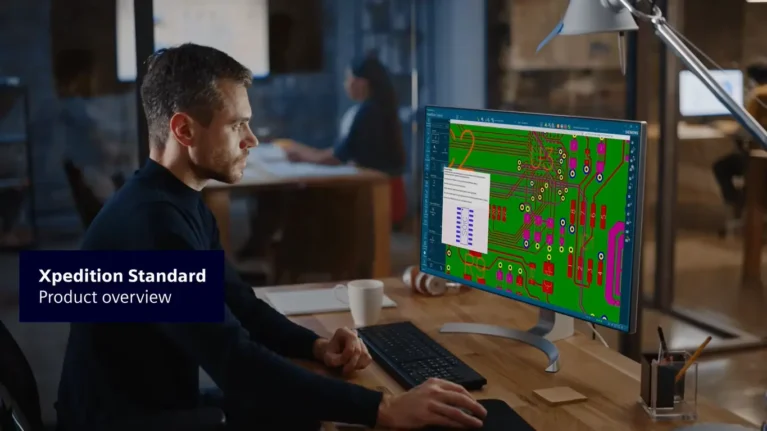

Siemens has officially released Xpedition 2610, the latest version of its Xpedition electronic systems design platform. This release focuses on improving design performance, data management capabilities, and integration across engineering workflows, from schematic capture and PCB layout to design verification.
1. Key Updates in Siemens Xpedition 2610
1.1. Expanded Options with Xpedition Advanced
Siemens introduces Xpedition Advanced, a version designed for smaller enterprises. This expands the product portfolio to address the needs of engineering teams with varying levels of design, workflow, and organizational complexity.
1.2. Optimized Workspace
The application bar has been redesigned in accordance with Siemens’ interface standards. By optimizing the toolbar area, the updated interface frees up screen space and enables engineers to access commands more quickly, even on standard-sized displays.
1.3. Full Encryption of Data in Transit
Xpedition 2610 strengthens security by encrypting all data transmitted between design tools, project management services, and concurrent multi-user workflows. This also covers forward/backward annotation and design packaging operations.
This enhancement helps protect engineering intellectual property when teams collaborate across distributed design networks, while supporting the secure-by-design principle.
2. System Engineering: Automating Verification and Managing Multi-Board Designs
For complex electronic systems, engineers need to maintain traceability from high-level design requirements through to connectivity and physical implementation. Xpedition 2610 adds several tools to automate verification, manage requirements, and validate connections between boards.
2.1. Automated Batch Verification and Regression Testing
Engineers can run multiple or all verification tasks in Batch mode. This capability is particularly useful when performing regression testing across multiple design variants, reducing the need to run and review each task individually.
2.2. Generating Traceable Digital Verification Records
With Xpedition Model-Based Engineering (MBE), an entire simulation suite can be launched from a single verification task. The system automatically generates Digital Verification Records, directly linking requirement objectives to individual nets in the design.
This allows engineers to track the relationship between original requirements and verification results at the connectivity level.
2.3. Reusable Protocol-Based Verification Templates
Xpedition 2610 allows engineers to create reusable requirements and verification templates for standard protocols such as DDR4, PCIe, and SerDes. These templates help reduce preparation time when starting new projects.
2.4. Interactive HTML Verification Reports
Verification results from MBE objects can be viewed directly through interactive HTML reports. The reporting interface supports issue classification and result reviews, helping accelerate the evaluation and approval process.
2.5. More Intuitive Multi-Board Signal Management
Signal Manager has been redesigned to help engineers validate inter-board connectivity. The new interface reduces false positives while minimizing the risk of connection errors between boards.
3. Schematic Design: Streamlining Workflows and Reusing Constraints
At the schematic design stage, Xpedition 2610 focuses on improving environment setup, navigation between schematic and layout, and the reuse of validated design constraints.
3.1. Faster Design Environment Setup with Setup Wizard
The semi-automated Setup Wizard helps new engineers become familiar with the design environment more quickly. It also enables enterprises to standardize workspace configurations across engineering teams.
3.2. Improved Cross-Probing Between Schematic and Layout
The Cross-probing architecture has been enhanced to better handle complex nets selected from Layout. This improvement addresses interface freezing during cross-probing operations while maintaining smooth bidirectional navigation between schematics and PCB layouts.
3.3. Reusing Constraints from Existing Projects
Xpedition 2610 improves Constraint Import capabilities. Engineers can search EDM projects by name or metadata attributes to retrieve the required rules. In addition, validated constraints from previous projects can be imported even without deploying EDM.
Experience the new Setup Wizard Interface in Xpedition 2610
Interface and Security Enhancements in Design Creation
Constraint Reuse in Xpedition 2610
4. Library and Design Data Management: Accessing Component Information and Accelerating Library Creation
Component data directly affects design accuracy and collaboration between engineering teams. In Xpedition 2610, Siemens focuses on improving component search, updating supply chain information, and standardizing library data.
4.1. Search for Components with PartQuest Directly in EDM
The PartQuest plug-in is integrated directly into EDM, allowing engineers to search for manufacturer components without switching between tabs or applications. Searches can be performed by supplier and through parametric filters.
4.2. Updated Supply Chain and Compliance Information
Logistics information, component availability, and manufacturers’ environmental and compliance documentation can be accessed directly through EDM Web and component detail views. This provides engineers with additional information when selecting and managing components in their designs.
4.3. Standardizing 3D Models with Siemens Parasolid
The central library can automatically convert legacy PADS Pro 3D models into the Siemens Parasolid format when opened. This standardizes 3D geometric data across Xpedition Standard and Xpedition Advanced, supporting consistency in electronic and mechanical design collaboration.
4.4. Enhancements to Cell Editor and Footprint Expert
Cell Editor allows engineers to edit or create Padstacks and change design units without closing the tool. In addition, Footprint Expert introduces support for more Padstack geometries, including chamfered square through-holes.
These enhancements give engineers greater flexibility when creating and editing component libraries.
Integrated Component Supply Chain Data with PartQuest Search
Customize Component Request Forms in EDM Collaborate
Enhancements to the Component Library Creation Workflow in Cell Editor
5. PCB Layout: Accelerating Complex Design Processing and Improving MCAD/ECAD Collaboration
Xpedition Layout 2610 introduces notable performance improvements, particularly for high-power-density boards with numerous overlapping power plane shapes.
5.1. Up to 10x Faster Power Plane Generation
For designs with thousands of overlapping power plane shapes, Plane Generation performance is improved by up to 10x. In addition:
- Board loading is up to 1.8x faster.
- Physical reuse block updates are up to 2.3x faster.
- Interactive plowing and via insertion through power planes are noticeably smoother.
These enhancements help reduce processing time and improve the workflow when working with highly complex PCB designs.
5.2. Improved ECAD/MCAD Collaboration with Siemens Designcenter
IDX file tracking and UID identification mechanisms have been enhanced, enabling more consistent baseline comparisons when exchanging data with Siemens Designcenter.
This improvement is particularly useful for large designs with nested reuse block structures, helping accelerate data exchange and synchronization between electronic and mechanical design teams.
5.3. More Flexible Mapping of Design Blocks from Logical to Physical Implementations
A Managed Block containing only logical information in the schematic can now be mapped to multiple physical reusable PCB layouts.
This allows the same circuit functionality to be implemented across boards with different mechanical dimensions and shapes, increasing design reuse across multiple product variants.
5.4. Enhanced Creepage Distance Checking
Batch Creepage Analysis has been improved. Engineers can review, accept, and audit insulation clearance violations directly in Hazard Explorer.
The process also includes timestamps and user comments, supporting the tracking and management of decisions made when addressing violations.
Integrated Creepage Distance Checking in Batch Check Mode
Simplifying More Flexible Design Reuse
Streamlining Manufacturing Data Export with Global Search
Layout Interface and User Experience Enhancements
Managing and Synchronizing Design Variants to BluePrint Manufacturing Documentation
6. Design Verification: Integrating Verification Throughout the Workflow
Xpedition 2610 continues to advance the Shift-left Verification approach, bringing verification activities and manufacturability assessments earlier into the design process. Instead of waiting until the final stages to identify issues, engineers can evaluate physical and manufacturing-related factors directly within their working environment.
6.1. Valor NPI: Enhanced AI-Assisted DFM Verification
Valor NPI introduces a new verification workspace featuring an AI assistant, customizable layouts, and direct integration with EDM.
Engineers can perform Design for Manufacturing (DFM) analysis and then review the results in Hazard Explorer. The entire process supports version management, making it easier to track verification results across design updates.
6.2. HyperLynx Schematic Analysis: Schematic Analysis Within EDM
Xpedition 2610 enables HyperLynx Schematic Analysis to run directly within EDM-managed workflows. Violations can be tracked across multiple design versions.
To support analysis, results are grouped by severity level, including Critical, Defect, and Warning. Engineers can also cross-probe directly from the analysis results back to the Designer environment to investigate and resolve issues.
6.3. DC Drop Analysis: Monitoring Power Integrity at the Design Level
DC Drop Analysis is integrated into the EDM workflow, bringing Power Integrity assessment into the design management process.
Through this integration, engineers can monitor simulation status and pass/fail results directly within EDM.
Source: Siemens
Learn more:
- A Detailed Comparison of Siemens Xpedition Versions
- Xpedition Standard: Reduce PCB Design Cycles by Up to 50%
- Accelerating PCB Design with Xpedition and HyperLynx Signal Integrity Analysis
Contact Vietbay for direct consultations: